
Disclosure: SendSawa is our product, and we ranked it first.
WhatsApp is where most Nigerian online sales are closed, but WhatsApp itself cannot take a payment here. The free WhatsApp Business app gets you a catalogue and quick replies, and then you are back to sending account numbers and checking screenshots.
The best tool for a WhatsApp seller keeps the chat for questions and moves the payment to a link. SendSawa does that, so it is first here. If you only sell a few items a week, the free WhatsApp Business app on its own may be enough.
What is WhatsApp selling, and where does it get stuck?
Selling on WhatsApp usually means posting products on your status, answering questions in chat, and taking payment by bank transfer. It works well up to a point.
It gets stuck when you have more chats than hours. Buyers wait for a reply, someone pays for an item you already sold, and you lose track of who paid for what because the orders live inside a hundred chats.
What to look for in a WhatsApp selling tool
- It still sends buyers to your chat. WhatsApp buyers like to ask first. Do not take that away.
- Payment without you in the middle. A buyer should be able to pay at 2am while you sleep.
- An order list outside your chats. You need one place that shows who paid, what for, and where it is going.
- Stock that counts itself. So you stop selling the same last item twice.
WhatsApp selling tools in Nigeria compared
| Cost to start | Takes payment | Order list | |
|---|---|---|---|
| SendSawa | ₦0 | Yes | Yes |
| WhatsApp Business | ₦0 | No | No |
| Bumpa | ₦0, paid from ₦15,000/quarter | Yes | Yes |
| Catlog | ₦4,750/month | Yes | Yes |
| Paystack Storefront | ₦0 | Yes | Payments only |
| Flutterwave Store | ₦0 | Yes | Yes |
| Selar | ₦0, about 4% + ₦50 per sale | Yes | Yes |
Checked October 2026.
1. SendSawa: best for WhatsApp sellers who want payment without the back and forth
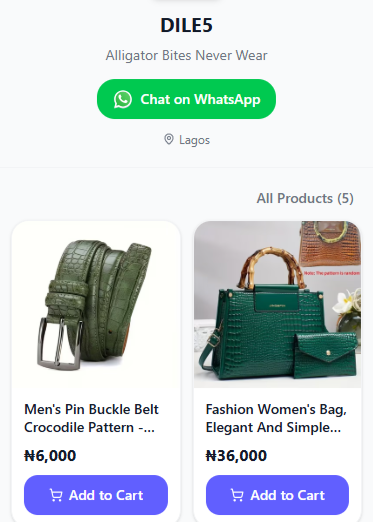
SendSawa gives you a store link to put on your WhatsApp status, in your chats and in your bio. Buyers browse, add to a cart and pay. A Chat on WhatsApp button sits on the store, so anyone with a question can message you with your products in front of them.
What it costs. Free for 10 products, no time limit. Growth is ₦5,000 a month for unlimited products. SendSawa takes 0% of your sales.
How buyers pay. By card through Korapay, which confirms the order straight away, or by bank transfer straight to your account, where the buyer WhatsApps you the receipt and you confirm the order. You can switch either one off.
What it adds for WhatsApp sellers. Every order lands in one list with the buyer's name, number and address. On Growth, buyers who fill a cart and leave appear in a follow-up list with a WhatsApp message already written for you to send.
Where it falls short. It does not reply to chats for you, and it has no broadcast tool for sending messages to all your customers at once.
2. WhatsApp Business: best free start
The WhatsApp Business app is free and gives you a business profile, a catalogue, quick replies, away messages and labels to sort chats.
What it costs. Nothing.
Where it falls short. There is no payment, no order list and no stock count. It is a tidier chat, not a store.
Pick it if you get a few orders a week and can keep up with every chat.
3. Bumpa: best for WhatsApp sellers with a shop and staff
Bumpa has a point of sale, staff accounts, stock across locations and SMS and email campaigns, alongside a website with a WhatsApp button.
What it costs. Free Basic plan, then ₦15,000 a quarter for Starter. No monthly option.
Pick it if you have staff answering your WhatsApp and a counter to run.
4. Catlog: best for sellers who send a lot of invoices
Catlog gives you a store link, an order list and invoices you can send in chat.
What it costs. ₦4,750 a month for Basic and ₦9,750 for Business+.
Pick it if many of your buyers want a proper invoice before they pay.
5. Paystack Storefront: best for a short list
A free product list with Paystack's checkout. You can drop the link into a chat.
What it costs. Free with a Paystack account. Paystack's payment fee applies.
Where it falls short. No stock counts, and you get payment records rather than an order list you can pack from.
6. Flutterwave Store: best for Flutterwave users
A free storefront with many ways to pay, tied to your Flutterwave account.
What it costs. No monthly fee. Flutterwave keeps 2% of local payments, capped at ₦2,000, plus VAT on the fee.
Where it falls short. Stock does not drop when you make a sale.
7. Selar: best for selling classes and downloads on WhatsApp
If your WhatsApp sells a training, a template or an ebook, Selar delivers the file and takes payment.
What it costs. About 4% + ₦50 per naira sale.
Pick it if you sell something buyers download.
How we ranked these WhatsApp tools
We looked for the tool that removes the most manual steps between "I want it" and "I have paid" for a seller of physical goods, at the lowest cost per order. If WhatsApp Business alone keeps up with your orders, you do not need any of the others yet.
Questions sellers ask about selling on WhatsApp in Nigeria
Can customers pay on WhatsApp in Nigeria?
Not inside WhatsApp. Sellers send account details or a payment link. A store link lets buyers pay by card or bank transfer without waiting for you.
Is WhatsApp Business enough for a small business?
For a few orders a week, yes. Once you are losing track of who paid or replying late, add a store link so payment and orders happen outside the chat.
What is the best tool for selling on WhatsApp in Nigeria?
We think SendSawa for most sellers of physical goods. It is free for 10 products and keeps a WhatsApp button on your store.
How do I share my products on WhatsApp status?
Post a photo of the product with the price and your store link in the caption. Buyers can tap the link and order without messaging you.
Try it on your next status
Post three products on your status with your store link instead of "DM for price". See how many buyers pay without asking. If you want to try SendSawa, the free plan needs no card.